

Facebook is introducing new AI-powered tools that give people more control over the content they see in Feed and Reels. These tools allow users to explain their interests in their own words and influence the recommendations they receive.
Until now, Facebook has mainly learned about people’s interests from their activity on the platform. This includes the posts they like, the comments they write, the videos they watch, and other interactions.
With the new Your Algorithm feature, people can also tell Facebook directly what they want to see more or less of. This creates a more direct way to personalise the Facebook experience.
In this article, we will explain what Your Algorithm is, how the new feedback options work, how AI helps personalise recommendations, and what these changes mean for Facebook users, creators, and businesses.
What Is Facebook’s Your Algorithm Feature?
Your Algorithm is a new Facebook feature that allows users to add and manage topics they want to see in Feed and Reels.
It gives people a dedicated place to explain their interests instead of relying only on their previous activity.
For example, a user may want to see more content about:
- Digital marketing.
- Technology and artificial intelligence.
- Travel and tourism.
- Fitness and healthy activities.
- Food and cooking.
- Photography and design.
- Education and learning.
Users can tell Facebook about the topics they enjoy. Facebook can then use this information to adjust the recommendations shown to them.
The main idea is simple: people can have a more direct conversation with the recommendation system and explain what interests them.
How Can You Find Your Algorithm on Facebook?
Meta says users can access Your Algorithm through the three-dot menu on Facebook posts.
The feature is being introduced as part of Facebook’s recommendation customisation tools. The exact availability and interface may vary as the rollout progresses.
The general experience includes these steps:
- Open Facebook.
- Find a post in Feed or Reels.
- Open the three-dot menu.
- Look for the available recommendation or Your Algorithm options.
- Add or manage topics based on your interests.
- Review the content recommendations as they adapt.
This gives users another way to influence what appears in their Facebook experience.

How Does Your Algorithm Work?
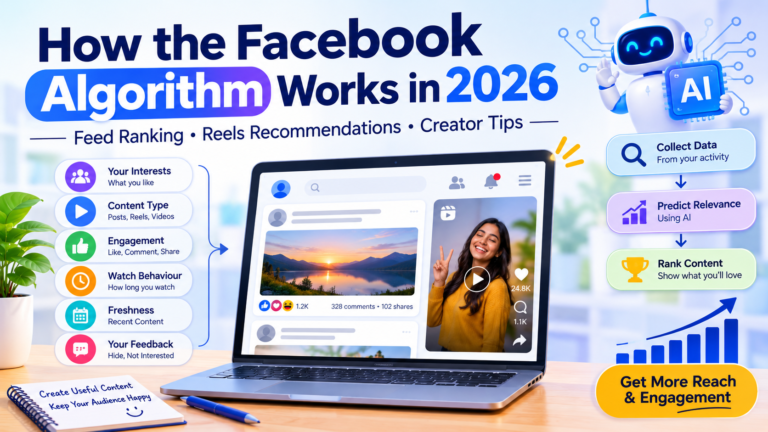
Facebook already uses ranking systems to understand what people may enjoy.
These systems can consider different types of activity, such as:
- Posts a person likes.
- Comments they write.
- Videos they watch.
- Content they share.
- Accounts and Pages they interact with.
- Other signals related to their activity.
Your Algorithm adds another type of information: direct instructions written by the user.
For example, imagine someone regularly watches travel videos but wants more content about budget travel in India.
They can communicate that interest directly through the new personalisation tools.
Facebook can use the topic, context, and intent in that feedback to adjust recommendations.
This makes the recommendation experience more flexible because users are not limited to the interests Facebook has inferred from their previous activity.
Tell Facebook What You Want to See in Your Own Words
One important part of this update is the ability to provide feedback using natural language.
Users can explain their preferences in their own words rather than selecting only from fixed categories.
For example, a user might express these preferences:
- Show me more beginner-friendly technology content.
- I want to see more travel videos about India.
- Show me fewer celebrity updates.
- I am interested in digital marketing and website design.
- I prefer educational videos over entertainment videos.
These examples show how someone might describe their interests. They are not guaranteed commands or exact interface options.
The purpose is to help Facebook understand not only the topic a person likes, but also the context behind that interest.
New Interested and Not Interested Feedback Options
Facebook is also introducing more ways for users to provide feedback directly from posts in Feed and Reels.
Two important options are Interested and Not interested.
1. Interested
When users see content they enjoy, they can select Interested.
Facebook may then ask follow-up questions to understand what they liked.
For example, someone may enjoy a video because it explains a useful topic, demonstrates a new skill, or shares information about a favourite hobby.
This additional feedback can help the recommendation system understand the user’s preferences in more detail.
2. Not Interested
Sometimes Facebook recommends content that does not match a person’s interests.
In this situation, users can select Not interested.
Facebook may ask additional questions to understand what they disliked.
This helps people explain what they want to see less often.
3. Recommendations Can Update in Real Time
Meta says recommendations can respond in real time to this feedback.
This means that users can communicate their preferences and see recommendations adapt during the same session.
The system can use this new information together with other signals it already understands.
Why Has Facebook Updated the Three-Dot Menu?
Facebook has also updated the three-dot menu on posts to make recommendation controls easier to access.
The menu is an important part of the content experience because it gives users options for responding to posts and managing what they see.
By making personalisation tools easier to find, Facebook wants users to have a more direct way to manage their Feed and Reels recommendations.
This is useful when people want to change their interests or give feedback about a particular post.
How AI Helps Facebook Understand Your Interests
Artificial intelligence is an important part of Facebook’s recommendation systems.
Meta explains that large language models, also called LLMs, are helping its ranking systems understand natural-language feedback.
An LLM can process language and identify information such as topics, context, and intent.
For example, consider the difference between these two statements:
- Show me travel videos.
- Show me affordable family travel ideas in Maharashtra.
The second statement provides more context. It describes the topic, budget preference, audience interest, and location.
Natural-language systems can help interpret these details and use them alongside other recommendation signals.
This makes it possible for users to express more specific interests.
How AI-Powered Ranking Systems Work
Facebook’s ranking systems combine different types of information to decide which content may be relevant to a user.
The new approach brings together direct written feedback and the signals Facebook already uses.
The process can be understood in four simple stages.
1. Understand User Activity
Facebook learns from interactions such as likes, comments, shares, and video viewing behaviour.
2. Understand Direct Feedback
Users can explain their interests and preferences in natural language.
3. Interpret Context and Intent
AI systems can help understand the meaning behind the user’s words, including the topic and context.
4. Adjust Recommendations
Facebook combines this information with existing signals to make Feed and Reels recommendations more relevant.
The important change is that users can now communicate their interests more directly.
What Does This Update Mean for Facebook Users?
The Your Algorithm feature gives users additional ways to shape their social media experience.
Some possible benefits include:
- More control over content recommendations.
- Easier ways to express personal interests.
- Better ways to reduce unwanted topics.
- More specific content recommendations.
- A more interactive personalisation experience.
- Faster feedback through updated recommendation systems.
For example, a person who uses Facebook for learning may want more educational content and fewer unrelated recommendations.
These tools provide another way to communicate that preference.
What Does This Update Mean for Content Creators?
This update is also relevant to Facebook creators.
Users can provide more specific information about the topics they enjoy. As a result, creators should focus on publishing content that clearly communicates its subject and provides value to the intended audience.
Here are some practical suggestions.
1. Focus on a Clear Topic
Make sure every post or video has a clear purpose.
If you create educational content, explain what viewers will learn.
2. Understand Your Target Audience
Research the interests, questions, and problems of the people you want to reach.
Create content that matches those needs.
3. Publish Original Content
Share your own ideas, experiences, demonstrations, and creative work.
Original content gives people a reason to follow your Page and engage with your posts.
4. Create Content for Specific Interests
Instead of publishing general content about a broad topic, consider creating useful content for a specific audience.
For example, a digital marketing creator could publish separate content about beginner SEO, Facebook marketing, WordPress, and website development.
5. Review Content Performance
Use available Facebook insights and professional tools to understand how people respond to your content.
Review reach, engagement, shares, and video performance.
Remember that these are practical content recommendations, not guaranteed ranking factors or promises of higher reach.
What Does This Mean for Businesses and Digital Marketers?
Businesses use Facebook to build brand awareness, share updates, connect with customers, and promote products and services.
The new personalisation tools make it important to communicate clearly about what a business offers and who its content is designed to help.
For example, a digital marketing business can publish separate content for:
- SEO beginners.
- Small business owners.
- Website development customers.
- Social media managers.
- People interested in online advertising.
This helps create a more organised content strategy.
Businesses should also focus on useful information rather than publishing promotional posts all the time.
A balanced content plan can include educational posts, product information, customer questions, demonstrations, and business updates.
How Should You Prepare for These Facebook Changes?
Creators, businesses, and social media managers can take a few practical steps.
- Review your current Facebook content strategy.
- Identify the main topics your audience is interested in.
- Create separate content themes for different audience needs.
- Use clear captions and descriptions.
- Publish original and useful content.
- Review the questions and feedback you receive.
- Monitor performance through Facebook insights.
- Adjust your content plan based on audience response.
The goal is to make your content easier for people to understand and more useful to the audience you want to reach.
Conclusion
Facebook’s Your Algorithm feature gives people a more direct way to control their Feed and Reels recommendations.
Users can add topics they are interested in, provide feedback through Interested and Not interested, and explain their preferences in their own words.
The introduction of large language models also helps Facebook understand the context and intent behind natural-language feedback.
For users, this means more ways to shape their social media experience. For creators and businesses, it is a reminder to publish clear, original, and relevant content.
As Facebook continues to improve its AI-powered recommendation systems, understanding audience interests and creating useful content will remain important parts of a good social media strategy.
Frequently Asked Questions (FAQs)
1. What is Your Algorithm on Facebook?
Your Algorithm is a new personalisation feature that allows users to add and manage topics they want to see in Facebook Feed and Reels.
2. How do I access Your Algorithm on Facebook?
Meta says users can find Your Algorithm through the three-dot menu on posts. Availability may vary during the rollout.
3. Can I tell Facebook what content I want to see?
Yes. The new tools allow users to express their interests in their own words and influence their recommendations.
4. What does Interested mean on Facebook?
Interested is a feedback option that allows users to tell Facebook they like a particular type of content.
5. What does Not interested mean on Facebook?
Not interested allows users to tell Facebook that a post or topic does not match their preferences.
6. Does Facebook use AI to recommend posts?
Yes. Facebook uses AI-powered ranking systems to understand user activity, interests, and feedback when recommending content.
7. What are LLMs in Facebook’s recommendation system?
LLMs are large language models. They help systems understand natural language, including the topics, context, and intent behind a user’s feedback.
8. Do Facebook recommendations change immediately?
Meta says recommendations can respond to user feedback in real time, including during the same session.
9. Does Your Algorithm affect Facebook Reels?
Yes. Meta says the new tools help users shape recommendations in both Feed and Reels.
10. Is Your Algorithm available to everyone?
Meta is rolling out the feature. Availability may vary depending on the account, region, and rollout stage.




Comments
Share your thoughts